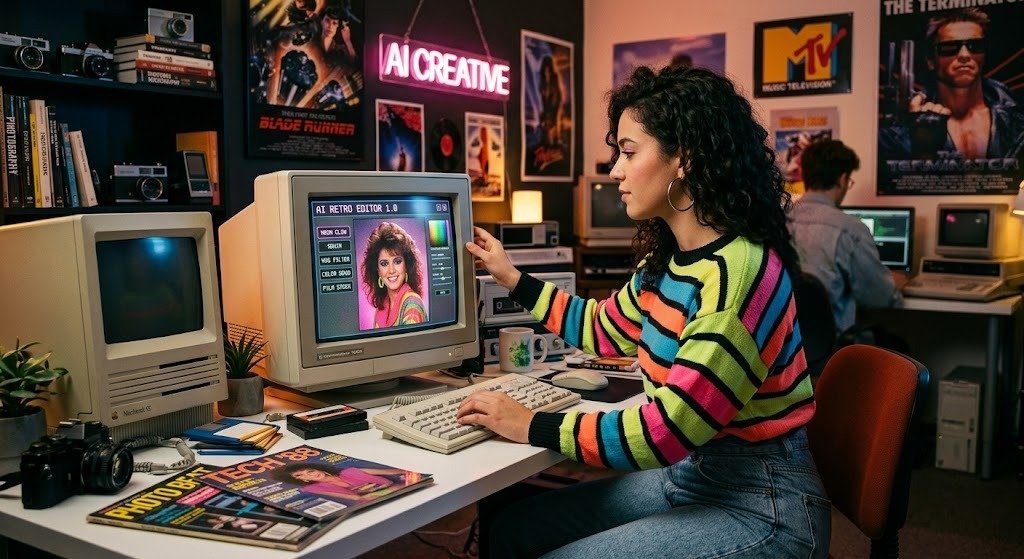

Okay, so if your Instagram feed has turned into a wall of glowing, big-haired, neon-lit portraits over the last few weeks, you already know what I’m talking about. This 80s photo trend has basically taken over — TikTok, Insta, even my family group chat somehow. And here’s the thing nobody really tells you upfront: the whole result depends on one thing, and one thing only — your 1980s trend photo prompt. Write a good one, and the AI genuinely nails it. Write a lazy one, and you get something that looks less “retro glam” and more “I found this outfit at a costume shop.” So let’s actually break down how to do this properly, plus I’ll throw in a few prompts at the end you can just steal.
What Even Is a 1980s Trend Photo Prompt?
In plain terms, it’s just the text you type into an AI tool — Midjourney, ChatGPT’s image feature, Lensa, pick your poison — that tells it how to turn your normal, boring selfie into something that looks pulled straight out of an old-school photo studio. The prompt is doing all the work here. It’s telling the AI what “80s” actually means: the hair, the lighting, the clothes, all of it.
And honestly? Most people get this wrong from the jump. They’ll type something like “make me look 80s” and just… expect it to work. It won’t, not really. The AI isn’t a mind reader. The more specific you get, the less it has to guess, and the better your photo turns out. That’s really the whole secret.
Why Has Everyone Lost Their Minds Over This Trend?
I mean, a few reasons come to mind:
- Nostalgia just performs well online, full stop
- You don’t need any editing skills — a decent prompt does all the heavy lifting
- It works with photos you already have, no reshoot needed
- It’s just… fun? Seeing yourself as an 80s mall photo is weirdly satisfying
Since most people are recycling the same five prompts they found on Reddit, actually learning to write your own gets you a result that doesn’t look like everyone else’s feed.
First Things First — Pick a Decent Photo
Before you even touch the prompt, grab a solid base photo. Front-facing, decent light, no sunglasses, nothing busy going on in the background. I’ve noticed AI tools really struggle when there’s clutter behind you or if you’ve already got a filter slapped on — you’ll end up with weird distortions or a face that just doesn’t quite look like yours anymore. Grab two or three different shots if you can, just in case your first attempt goes sideways.
Okay, Let’s Actually Write the Prompt
Step 1: Decide Which 80s Vibe You Want
There’s honestly more than one “80s look,” so pick your lane:
- Studio glamour — soft lighting, big hair, blazer with those shoulder pads
- Neon retro — bold colors, laser-grid backdrop
- Yearbook photo energy
- Rock poster / band photo type thing
Just pick one. Trying to smash all four into a single prompt is a recipe for a confused, muddy result.
Step 2: Describe Yourself (or Whoever’s in the Photo)
Don’t skip this part, seriously. Gender, rough age, expression, pose — something like “a guy with a relaxed half-smile, angled slightly to the side.” Vague input equals vague output. Every single time.
Step 3: This Is Where the 80s Magic Actually Happens — Fashion and Hair
- Big, permed, or teased-out hair
- Shoulder-pad blazers, or a denim jacket if you’re going casual
- Bold blush, dramatic eyeshadow
- Chunky earrings, maybe a headband
Step 4: Lighting — Don’t Skip This, I Mean It
This is the one detail people forget, and it’s the one that matters most. Phrases like “soft studio lighting,” “warm film grain,” or “vintage flash photography” push the AI toward that slightly imperfect, analog feel instead of that flat, obviously-AI look.
Step 5: Background and Mood
This is where a lot of the actual “feel” comes from. Laser grids, soft gradient backgrounds, that smoky studio look — all very of-the-era. And don’t forget a mood word. “Glamorous,” “energetic,” even “dreamy” — whatever matches what you’re going for — so it doesn’t just look retro, it feels retro too.
Step 6: Adjust, Don’t Restart From Scratch
Your first result won’t be perfect. That’s just how it goes. Change one thing — hair, lighting, whatever’s bugging you — instead of blowing up the whole prompt and starting fresh. You’ll actually start figuring out which words are pulling their weight.
So Which App Should You Actually Use?
- Midjourney — probably the most polished, artistic output, but there’s a bit of a learning curve
- ChatGPT’s image tool — fast, easy, great if you’re new to this
- Lensa AI — literally built for portraits
- Remini — if you just want something quick, this’ll do it
Honestly, try the same prompt on two different tools once. They don’t interpret things the same way, and you might just like one style better.
Prompts You Can Literally Just Copy
Studio Glamour:
“A retro 1980s studio portrait, big permed hair, bold blush, shoulder-pad blazer, soft glowing studio lighting, warm film grain, confident smile, vintage photography style.”
Neon Retro:
“An 80s-style portrait with a neon laser background, teased hair, denim jacket, dramatic colored lighting, glossy vintage flash photo, energetic pose.”
Yearbook Style:
“Classic 1980s yearbook photo, soft blue gradient background, feathered hairstyle, pastel sweater, warm nostalgic lighting, gentle smile.”
A Handful of Extra Tips
- Keep it under 60 words — a rambling prompt just loses the AI’s attention
- Commas beat long sentences, always
- Think mall portrait studios or old magazine covers for inspiration
- Don’t blend decades. Mixing in 90s or 70s stuff just muddies everything
Mistakes I See Constantly
- Being vague — “80s style” alone just isn’t enough
- Skipping lighting details entirely, which flattens the whole thing
- Throwing in way too many unrelated ideas at once
- Scrapping the whole prompt instead of tweaking one small piece
Image Suggestions
A few visuals worth adding here:
- A before-and-after selfie shot (alt text: “1980s trend photo prompt before and after example”)
- A screenshot of someone typing a prompt into an AI tool (alt text: “example of a 1980s trend photo prompt”)
- A small grid of 3–4 different 80s-style AI portraits (alt text: “1980s style AI generated photos”)
FAQs
What’s a 1980s trend photo prompt actually for?
It tells an AI tool how to turn your regular photo into an 80s-style retro portrait.
Which app gets the best results?
Midjourney and Lensa AI tend to come out on top for realism.
Do I need some fancy professional photo?
Not at all. A plain, clear selfie is honestly all you need.
Does this work for guys and kids too?
Yep, just adjust the clothes, hair, and pose to match.
Why does my result look off?
Nine times out of ten, it’s missing lighting or hair detail. Add more and try again.
How long should my prompt actually be?
One or two sentences packed with detail. Short and specific always beats long and vague.
Wrapping This Up
So there you go — you now know what it actually takes to write a 1980s trend photo prompt that gets you something worth posting, instead of a generic filter effect everyone’s seen a hundred times. Pick a good base photo, get specific about hair, fashion, and lighting, and don’t be afraid to tweak things bit by bit instead of starting over each time.
Want to try it right now? Grab one of the prompts above, drop it into whichever AI tool you’re using, and see what comes out. You might genuinely be surprised.